

Ryan Reychico, Software Engineer at Gaia-X
Published in the June edition of the Gaia-X Magazine
1. Introducing the Gaia-X Wizard
Obtaining a Participant Compliance Credential by hand means assembling a certificate, a decentralised identifier, three separate credentials, client-side signing and clearing-house validation — a lot of moving parts for any team. The Gaia-X Participant Credential Wizard folds all of that into a single guided interface. Technically, the Gaia-X Participant Credential Wizard v2.0.0 is a free, browser-based web application. It helps organisations create and sign verifiable presentations and obtain a Gaia-X Participant Credential based on the criteria of the current version (2.5) of the Gaia-X Compliance Document. It is equally useful as a learning tool, making the abstract concepts of verifiable presentations (VP) and verifiable credentials (VC) tangible by letting you build them one step at a time. It is designed for a broad audience:
• Organisations preparing to become Gaia-X participants
• Compliance and trust managers who need a defensible, auditable process
• Technical architects and identity specialists working with DIDs and credentials
• Ecosystem federators guiding members through onboarding
Compared with doing everything by hand, the Wizard adds real value: a visible progress stepper, an integrated call to the Gaia-X Registration Number Notary, client-side signing that keeps your private key on your own machine, and oneclick submission to a Clearing House.
2. Before You Begin: What Production Mode Needs
Because production mode issues credentials under your own identity, a few things must be in place before you can productively use the Wizard. Two of them are obtained outside the tool, so it is worth preparing them in advance:
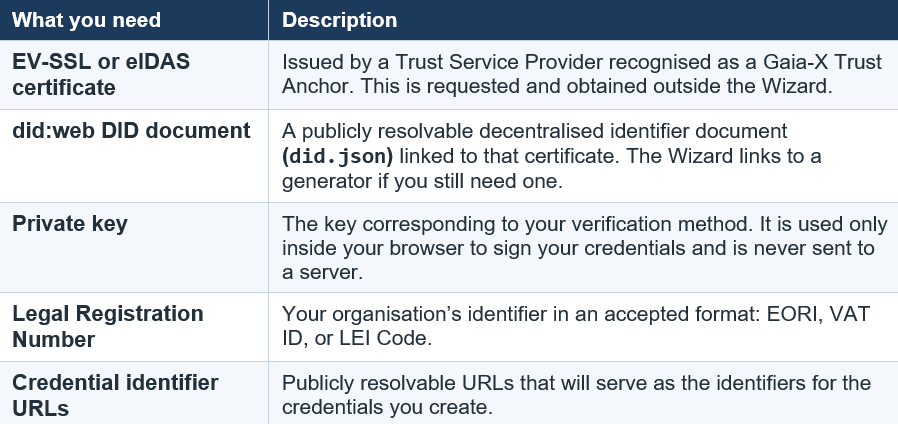
With these in place, you are ready to start. In production mode the Wizard automatically submits your Verifiable Presentation to one of the official, certified Gaia-X Digital Clearing Houses (GXDCH) — which only accept certificates from recognised Trust Anchors such as eIDAS or EVSSL — and returns a real, officially recognised Compliance Credential tied to your organisation.
3. The Guided Compliance Journey
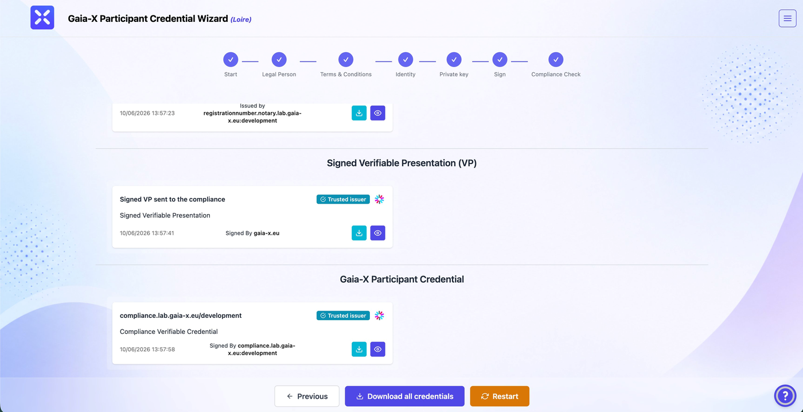
The heart of the Wizard is a seven-stage stepper displayed across the top of the screen, so you always know where you are. Each stage gathers one piece of the puzzle and hands off cleanly to the next.
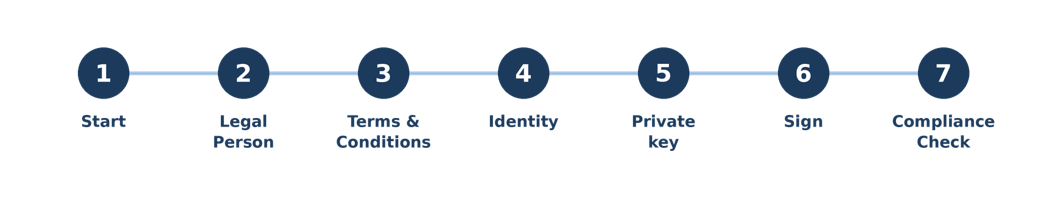
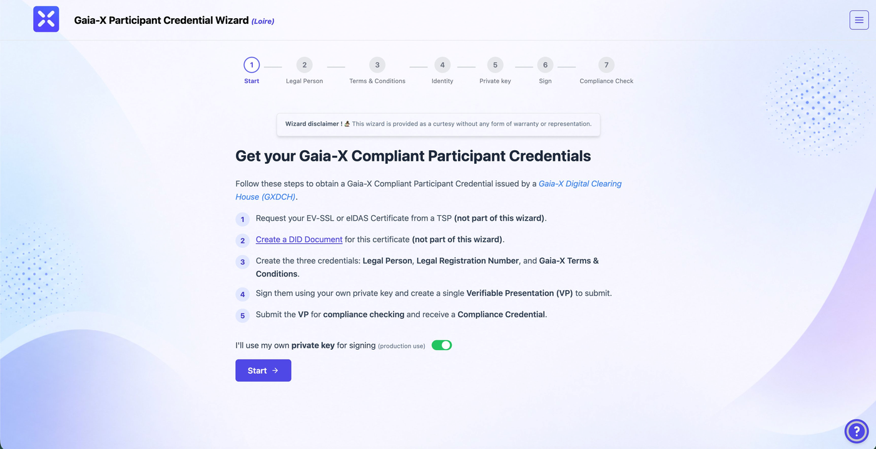
1 Start. A concise overview lays out the full journey, including the two external prerequisites the Wizard cannot perform for you. A single toggle — “I’ll use my own private key for signing (production use)” — puts you in production mode for everything that follows.
2 Legal Person. You enter your organisation’s legal name, its Legal Registration Number (choosing the type), and the headquarter and legal-address countries. Behind the scenes the Wizard calls the Gaia-X Registration Number Notary to validate the number and return a signed Legal Registration Number credential — so you don’t have to craft it yourself.
3 Terms & Conditions. You review and accept the Gaia-X Trust Framework Terms & Conditions with a single checkbox, which generates the corresponding credential recording your acceptance . Figure 1. The Start screen: the progress bar, the five-point overview, and the production-mode toggle.
4 Identity. You supply your did:web issuer, the verification method from your DID document (did. json), and the public URLs that will identify each credential. A linked did:web document generator is provided for anyone who still needs one.
5 Private key. You paste your private key. Crucially, it is used purely on your own machine to sign your credentials and is never transmitted to any server — the next section explains exactly how this is handled.
6 Sign. The Wizard signs your credentials and bundles them into a single Verifiable Presentation, ready for submission.
7 Compliance Check. The Verifiable Presentation is sent to a Gaia-X Digital Clearing House. If every credential checks out, the GXDCH returns your signed Compliance Credential, which you can then download together with your other credentials as a single archive.
4. Privacy and Security: Your Key Stays With You
For most organisations the single most sensitive element of the whole process is the private key used for signing — and this is precisely where the Wizard is designed to be careful. Although you type your key into the Private key step, the Wizard treats it as something to be used, not stored or shared.
YOUR PRIVATE KEY NEVER LEAVES YOUR BROWSER
- Never sent over the network. Signing happens entirely on your machine. The key is not uploaded to the Wizard, to the Clearing House, or to any other server.
- Never written to storage. It is held only in memory for the brief moment it is needed — it is not saved to local storage, session storage, cookies, or any other persistent browser store.
Used for one purpose only. It signs your Verifiable Credentials locally, producing the signatures that the Clearing House later verifies against your public DID.
In practice this means the cryptographic material that proves your identity stays under your control at all times. Only the resulting signed credentials — never the key itself — travel onward for compliance checking. The same client-side principle runs through the whole tool: the Wizard acts as a guided interface around your own keys and identifiers, not as a custodian of them. For organisations bound by strict data-protection or key-management policies, that distinction matters.
5. The Credentials You Generate
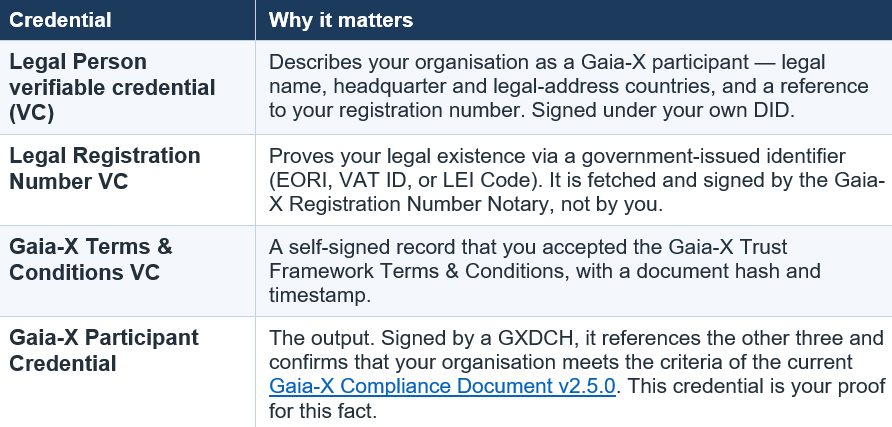
By the end of the flow you hold a small, coherent bundle of credentials — three that you (or the Notary) create as inputs, and one that a Gaia-X Digital Clearing House issues as the result.
6. Key Benefits
• Simplified onboarding — one guided interface replaces a chain of disconnected manual tasks.
• Reduced complexity — the Notary call, credential assembly and Verifiable Presentation packaging happen for you.
• A guided, transparent process — the seven-step stepper keeps your progress visible at all times.
• Privacy and security by design — client-side signing keeps your private key on your own machine, never transmitted or stored.
• Native verifiable-credential support — built around W3C DIDs and VCs, the standards that underpin Gaia-X trust.
• Interoperability — credentials are issued in a form any Gaia-X participant can independently verify.
• Faster access to the ecosystem — a clear path from organisation details to a signed Compliance Credential.
7. Conclusion
Gaia-X compliance rests on rigorous cryptographic standards — and that rigour can be intimidating. The Gaia-X Participant Wizard’s achievement is to make those standards approachable without diluting them. By guiding organisations through each stage of the Loire process, calling the Registration Number Notary on their behalf, signing securely on the user’s own machine, and submitting directly to a Digital Clearing House, it turns a daunting technical exercise into a process most teams can complete in a single sitting.
If your organisation is ready to obtain an official Gaia-X Participant Credential, gather your certificate, DID document and registration number, and let the Wizard guide you through the rest: wizard.lab.gaia-x.eu.
USEFUL LINKS
Gaia-X Wizard — wizard.lab.gaia-x.eu
Wizard User Guide — wizard.lab.gaia-x.eu/userGuide
Get a Legal Registration Number — wizard.lab.gaia-x.eu/legalRegistrationNumber
did:web Document Generator — mydid.info
Gaia-X Digital Clearing House (GXDCH) — docs.gaia-x.eu/#/gxdch
Gaia-X Trust Framework documentation — docs.gaia-x.eu
Contribute (source) — gitlab.com/gaia-x/lab/…/gx-signing-tool